
AI Starter Pack Generator Guide (2026): Action Figures, Toy Packaging & Viral Meme Sets
Learn how to create viral AI Starter Packs in 2026 — from action figures and toy-box packaging to custom digital dolls and animated figure videos. Includes prompts and step-by-step guidance.

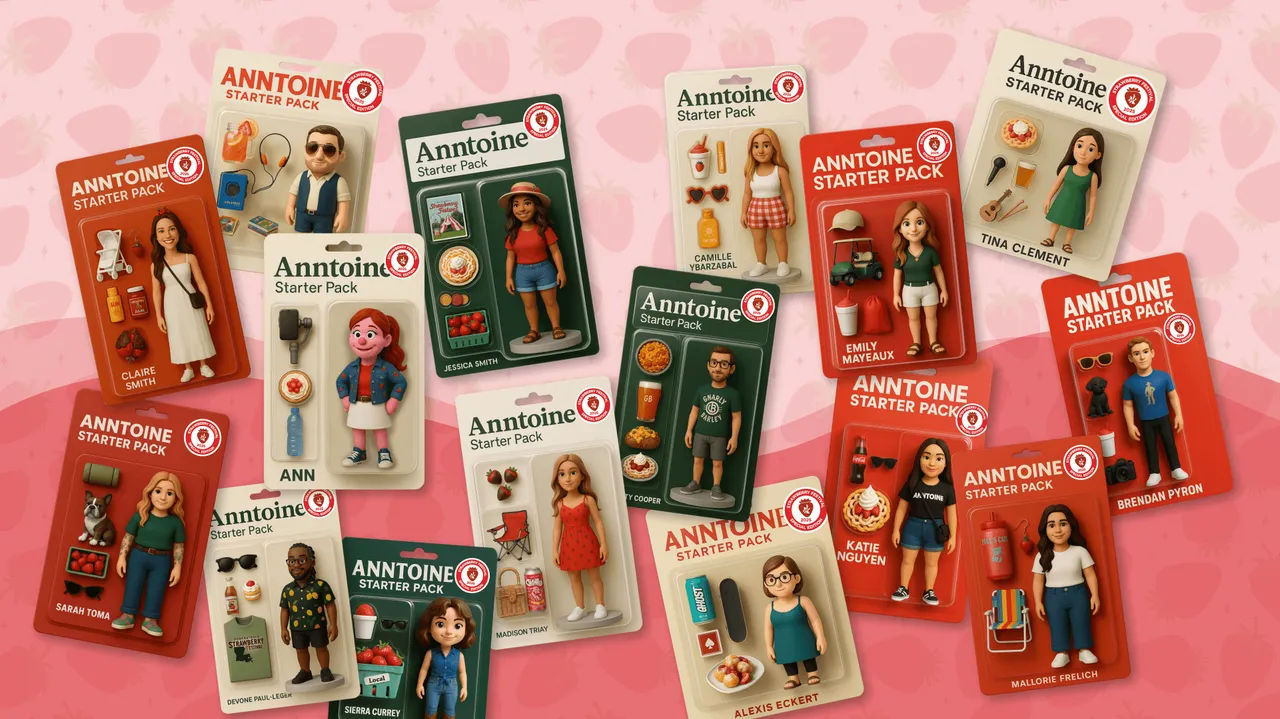
Recently, a brand-new creative trend has been sweeping across social media and the design community — the AI Starter Pack. This format carries a hint of nostalgia while being full of humor and personal expression. With just a few images and a handful of iconic items, it can precisely capture an identity, character, or persona. And now, empowered by AI, anyone can effortlessly create their own Starter Pack visuals.
From cartoon-style action figures and Barbie-style boxed packaging to four distinctive signature objects paired with the bold “Starter Pack” label, this toy-box aesthetic has exploded across major platforms. It’s funny, a bit exaggerated, and somehow always able to portray snapshots of 2025 life in the simplest way: the clean girl, the finance bro, the Strava runner… No one can escape this wave of collective self-mockery.
AI tools (such as ChatGPT, Midjourney, DALL·E, etc.) have only fueled this trend even further. Visuals that once required a designer to craft can now be created by everyday users with a single prompt. It satisfies our need for self-expression, group identity, and meme culture, while also reflecting how internet culture continues to find new ways of expression through AI.
In this article, we’ll explore how to use AI to generate your own Starter Pack images — from concept development and prompt writing to customizing styles and presentation. This makes the Starter Pack not just a meme, but a creative expression that truly belongs to you.
What exactly is a Starter Pack?
The Starter Pack can be traced back to the early 2010s, when it existed as a minimalist, low-cost meme format: a white background, four completely unrelated images, and sometimes even rough layout — yet it could perfectly capture the vibe of a group, character, or subculture. Examples include the “Hypebeast Starter Pack” or “FIFA Player Starter Pack” — what made them work wasn’t design, but familiarity + relatable stereotypes that people instantly understood.
The essence of this type of Starter Pack is using a few seemingly random elements to piece together a personality, lifestyle, or identity. Simple, direct, funny, and extremely shareable.
And by 2024–2025, everything has been transformed by AI.
No more searching for materials online, taking screenshots, or manually dragging elements in PPT. Now, with just one smart prompt, you can generate a set of Starter Pack images with unified style, clear composition, and even a unique aesthetic.
What is the result?
The Starter Pack is no longer just an “image collage,” but has evolved into a fully customizable and highly stylized form of visual expression.
So on Twitter (X), Instagram, LinkedIn, and TikTok, you will now see:
- Action-figure style Starter Packs
- Barbie doll boxed Starter Packs
- Game character equipment packs
- Starter Packs for office workers, students, and hobby communities
- Exclusive sets for virtual characters and IPs
Almost every time you refresh the feed, someone is using AI to create a new Starter Pack — it has already evolved from a simple meme into a creative storytelling format.
At the end of the day, the core of the Starter Pack hasn’t changed: Using the fewest elements to capture the soul of an identity or personality. The difference is that with AI, it can finally look better, feel more accurate, and be a lot more fun.
Why did AI Starter Packs go viral?
The reason AI Starter Packs suddenly exploded in popularity is actually very simple: they are easy, fun, and close to everyday life. The charm of this format lies in its ability to instantly trigger a sense of “social recognition” — everyone can see themselves, their friends, coworkers, or even their entire community reflected in these Starter Packs. When people see these images, their first reaction isn’t logical analysis but that instant feeling of “Oh my god, this is literally me 😂.”
These small, direct emotional hits are the key to why they spread so wildly across social networks.
Visually, they are clear, concise, and have just the right information density; emotionally, they’re light, funny, and instantly understandable; in terms of format, they perfectly match fast-scrolling content. For social media algorithms, this is the ideal combination: quick comprehension → instant emotional response → comment recognition → massive reposts and imitation content. And just like that, a perfect viral loop is formed.
More importantly — they are incredibly easy to create. You don’t need to know how to draw, and you don’t need software skills. With just one good prompt, you can produce your own Starter Pack within minutes. Even if you don’t have a prompt? No problem — the internet is full of tutorials, templates, and ready-made examples to reference.
How to create an action-figure-style AI Starter Pack
Generating an action-figure-style Starter Pack is actually very simple. As long as you master a few key steps, you can upgrade a regular image set into a toy packaging style Starter Pack that feels more collectible, more conversation-worthy, and far more likely to go viral on social media.
AI’s role is to generate the visuals, but what truly determines the quality of your creation is the character positioning, accessory selection, and the overall sense of story.
Step 1: Clearly define who this action-figure Starter Pack is designed for
The first step in creating an action-figure-style Starter Pack is to determine who the main character is. This is the soul of the project. AI must know what type of person or character you are making so it can maintain a consistent style.
You can start from these angles:
- 📌 Professional roles: freelance writer, veterinarian, fitness coach, barista, programmer
- 📌 Era styles: 90s hacker, 80s punk teen, futuristic cyber samurai
- 📌 Film/cultural archetypes: movie villain, romantic comedy heroine, dystopian survivor
- 📌 Hobby communities or social labels: urban cyclist, indie band member, tabletop gamer, cat lover
When the character definition is clear, the AI-generated action figure will have more consistent style, stronger IP identity, and be easier for users to recognize and share.
Think of it this way: you are creating a figure that could genuinely appear on the shelves of a toy store.
Step 2: Choose the key items for the Starter Pack
A great Starter Pack usually needs only four essential objects to instantly reveal the character’s personality. This is also why Starter Packs can quickly grab attention and generate shares and engagement.
You can think of this step as: “If this character were turned into an action figure, what small accessories would be included in the box?”
Below are some common and high-search-demand Starter Pack accessory categories that also work extremely well for AI-generated action-figure styles:
- Tools: stethoscope, coffee cup, mechanical keyboard, scroll
- Clothing: lab coat, hoodie, mecha shoulder armor
- Accessories: LinkedIn tab, headphones, drone
- Environment / signature props: portable dog kennel, neon city backdrop, camping lantern
The more specific these items are, the more accurately AI can identify the character’s traits — and the easier it becomes for the Starter Pack to evoke that “this is so them” feeling.
Step 3: Clearly describe the image requirements
Many beginners write prompts with only one sentence:
“Generate an XX Starter Pack.”
This wording is too vague. The AI doesn’t know whether you want a toy packaging style, a realistic photo, a four-grid layout, or simply a collection of objects.
Naturally, the result will deviate from your expectations.
The correct method is to clearly describe the style, layout, and accessories you want. For example:
“Generate an action-figure-style Starter Pack image that includes a veterinarian toy figure (with a stethoscope), a bag of dog food, and a portable dog kennel. Use a toy packaging layout, with the four items neatly displayed, clean background, soft high-key lighting, and a Collector Edition aesthetic.”
A prompt like this is not only more specific but also helps the AI maintain a consistent style, making the final result stable, clear, and directly aligned with the exact Starter Pack you envisioned.
Step 4: Edit and refine your action-figure Starter Pack
Generation is only the beginning. What truly makes an action-figure Starter Pack look more professional and more like a full series is the post-editing process. Today’s models support direct editing of already-generated images — you don’t need to rewrite prompts or re-upload reference images. With just one clear instruction, you can update the content of the image.
Here are the most common and practical editing methods:
1.Modify text and labels For example: “Change the label on the packaging from ‘Veterinarian’ to ‘Animal Doctor’.” The model will keep the layout unchanged and only update the text, which is perfect for name adjustments or style consistency.
2.Replace or fine-tune accessories When creating different versions of the set, you only need to specify the replacement, such as: “Replace the stethoscope with a syringe.” “Add a bag of cat food in the lower-left corner.” The model will automatically match lighting and style so the new object blends naturally into the scene.
3.Adjust packaging style or color scheme You can quickly change the overall vibe: “Change the packaging from blue to pastel colors.” “Make the box design look more like a trendy blind-box toy.”
No need to regenerate — the style update completes in seconds. The principle for editing is simple: the more specific the description, the more accurate the result. You only need to explain what to change and what to change it into — the AI will execute it precisely without disrupting the character design or overall composition. This makes it perfect for creating series editions, themed sets, or limited-edition designs.
Step 5: The more specific the prompt and the fewer the restrictions, the better the Starter Pack results
When generating action-figure Starter Packs, there is a simple principle that can significantly improve success: the more specific the prompt and the clearer the theme, the more stable the AI output; the fewer constraints you impose, the more freely the AI can create.
If you want the Starter Pack style to remain consistent — such as keeping the same character design, unified toy packaging style, or a cohesive character series — you need to maintain fixed descriptions in your prompt, including the character identity, accessory list, color style, and layout structure.
But if you want the AI to explore more possibilities — such as new accessory combinations, different character poses, or entirely new thematic directions — then you only need to give the general theme and the main items. Reducing constraints often leads to more creative results.
This principle is especially important when creating an “action-figure Starter Pack series”:
- If you want consistent style → include as many detailed descriptions as possible
- If you want variety and creativity → just provide the theme and key items
Mastering this balance allows you to easily create Starter Pack images that are both stable and imaginative.
Generate a custom Starter Pack
The greatest advantage of generating a custom Starter Pack is that you can turn your brand, product, or even yourself into an AI-styled action figure or digital doll, making the entire visual expression more fun and more personalized. You can include brand logos, mascots, or products as small accessories within the set, naturally showcasing brand characteristics through these objects — perfect for creating light, memorable visual content on social media.
Commercial assets can also be integrated easily, such as product packaging, logos, promotional graphics, or feature icons. When these elements are incorporated into the Starter Pack, they transform traditionally serious assets into something more creative and more shareable.
You can also turn yourself into an “AI intelligent doll.” Simply upload a selfie or reference image, and the model will generate a digital doll version of you based on your facial features, outfit, and personal style. Then, by pairing it with the items you use in daily life, you can present a miniature world that belongs uniquely to you.
Whether for personal expression or brand presentation, a custom Starter Pack makes your content more distinctive and more aligned with the image you want to showcase, while also delivering exceptionally strong social sharing potential.
How to turn yourself into a poseable action figure
Want to turn yourself into a toy figure?
With the AI image generation features of createimg.ai, you can easily transform your own likeness into an action figure, and even design a personalized Starter Pack that includes themed packaging, accessories, labels, and more — making your creation both fun and collectible.
Follow the steps below and you can instantly create your own toy-style character:
1.Open createimg.ai — On createimg.ai, you can choose models such as FLUX.1, GPT-4o, Seedream, and others. They all support “character stylization,” “packaging design,” and “action-figure-style” generation.
2.Upload a reference image (optional) — Select a model that supports this feature and upload a photo of yourself to guide the AI.Be sure to say: “Use this photo as the reference for face and body.”
3.Write a clear prompt — describe the appearance of the action figure in the input box. For example: “Design a realistic action figure packaged inside a toy box printed with ‘[your brand or name]’. The figure should be displayed alongside accessories, each placed in its own blister compartment. [List the accessories, for example: 1. sunglasses, 2. smartphone, 3. backpack]. The packaging should be visually appealing and themed around [industry or style, such as: tech, fashion, fitness, gaming]. Do not display any printed character artwork on the box.”
4.(Optional) Refine the results — if the output is not ideal, adjust the prompt. Createimg.ai can help optimize your wording to improve character design, pose, or packaging.
5.Download and save your image — once you are satisfied with the result, download the image. You can then animate it or further customize it using additional tools.
How to use an image-to-video tool to animate your action figure
If you have already generated the image of your action figure, then the next step is simply to use an AI tool that supports “image to video” (such as Veo3) to bring it to life. The process is very simple:
Step 1: Open createimg.ai
Go to createimg.ai and select Veo3 in the video generation module. Veo3 is a model specifically designed for “static image → coherent animation,” making it ideal for giving action figures natural small movements, camera motion, and dynamic lighting effects.
Step 2: Upload your action figure image
Upload the action figure image you generated on createimg.ai as the main source material. You can use a single figure photo or a version that includes the toy packaging box.
Step 3: Enter a prompt to control movement and camera animation
The tool will automatically create animation based on your description, including character movement, camera shake, scene transitions, and more.
Ready-to-use action figure animation prompts:
Basic animation prompt
Turn the uploaded action-figure image into a short animation.
Keep the toy’s proportions and materials consistent.
Add simple movements such as a small head turn, a slight arm raise, and subtle posture shifts.
Use soft studio lighting and gentle camera motion like a slow zoom-in.
Avoid deforming the character.
Advanced dynamic prompt
Create a dynamic animation based on the uploaded action-figure.
Animate lifelike toy motions: head tilt, arm wave, a tiny bounce, and a final hero pose.
Add cinematic camera movement with smooth panning and depth shifts.
Keep the toy’s original texture and proportions intact.
Toy packaging display prompt
Animate the uploaded action-figure inside its toy packaging box.
Add subtle reflections on the plastic window, small figure movements, and soft lighting transitions.
Rotate the camera slowly around the box to highlight the packaging details.
Keep the layout and printed elements consistent.
Step 4: Generate and download the video
After clicking generate, Veo3 will automatically convert your static action figure into a dynamic short video. Once you are satisfied, you can download it for use in social media showcases, brand content, or product demonstrations.
Your Starter Pack is just one generation away
The reason AI Starter Packs quickly became the new favorite of social media and the design community in 2025 is that they are not only fun but also expressive, making it easier for everyone to find their own identity symbol. From action figures and toy packaging to a combination of four signature items — it is no longer just a meme, but a visual language that anyone can use.
With AI, you can turn a character, a brand, a product, or even yourself into a unique digital figure, and build a complete set, story, and style around it.
Whether you want to create IP characters, brand content, a visual series, or simply share a personality-filled image on social media, today’s tools make it all easy and achievable. Upload a picture, write a prompt, and you can build your own miniature universe from scratch; if you wish, you can even generate dynamic videos for your action figure, making the character truly “come alive” and increasing both expressiveness and shareability.
If you want to start creating your own AI Starter Pack, digital doll, or action-figure-style visual content, you can directly use the AI image generation feature on this site to create them quickly, and pair it with AI video generation (image to video) to bring your figure to life.
This is the simplest—and currently the most popular—way to get started: easy, fun, and highly shareable.
Start creating now:
⭐ AI Image Generator — generate figures, packaging, and Starter Packs with a single prompt
⭐ AI Video Generator — turn your figure into fluid animation with real storytelling power
Open it anytime and start creating, turning your Starter Pack from a “concept image” into a fully realized piece of visual content.
Try it
Run your own prompt in the generator
Pick a model, run one prompt, and compare the results side by side. New accounts start with free credits.
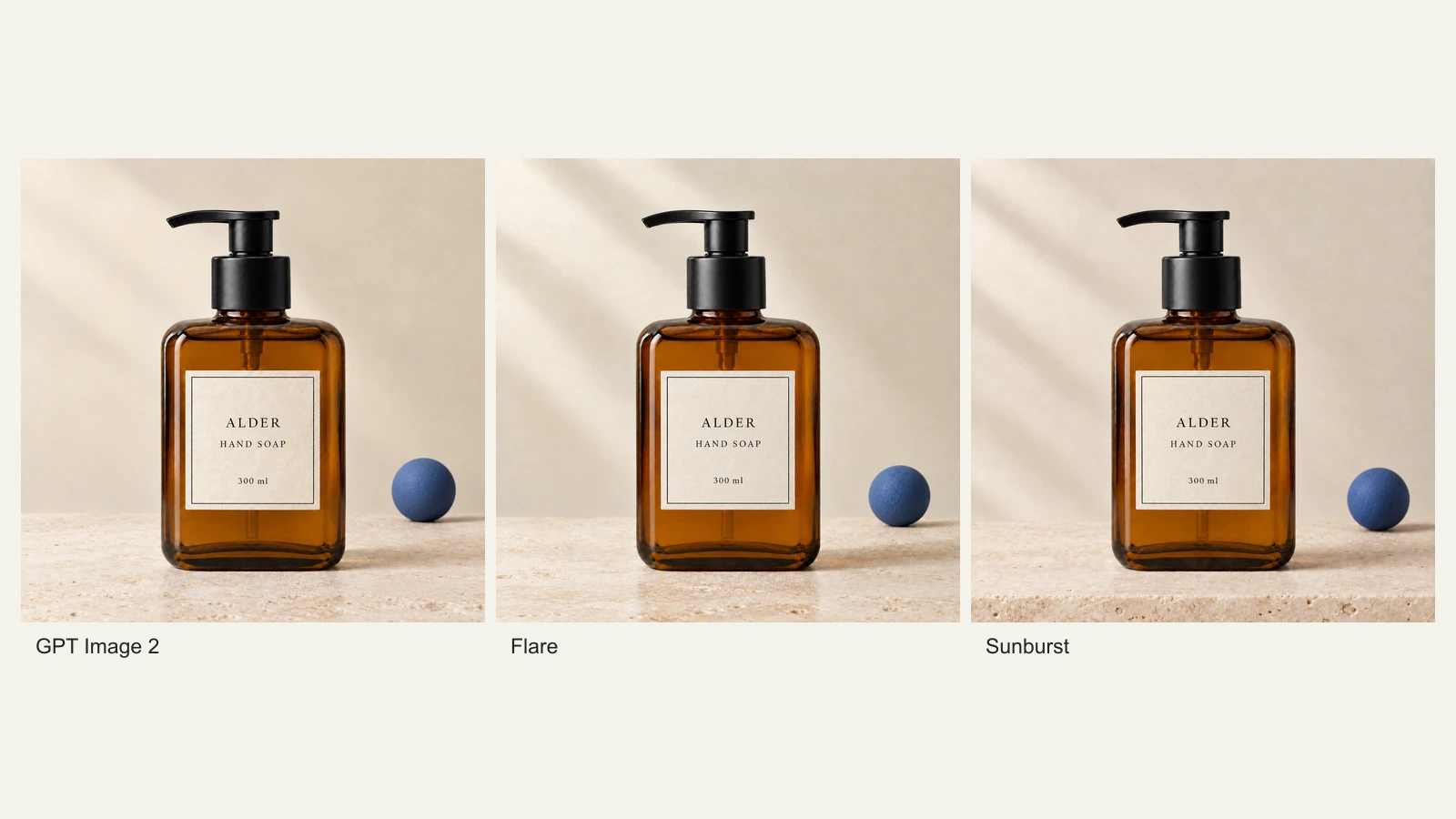
GPT Image 2.5 Flare vs Sunburst: Product Photo Edits Tested
We compare Flare, Sunburst and GPT Image 2 across 18 product-photo edits: label fidelity, material changes, editing speed and current site credits.
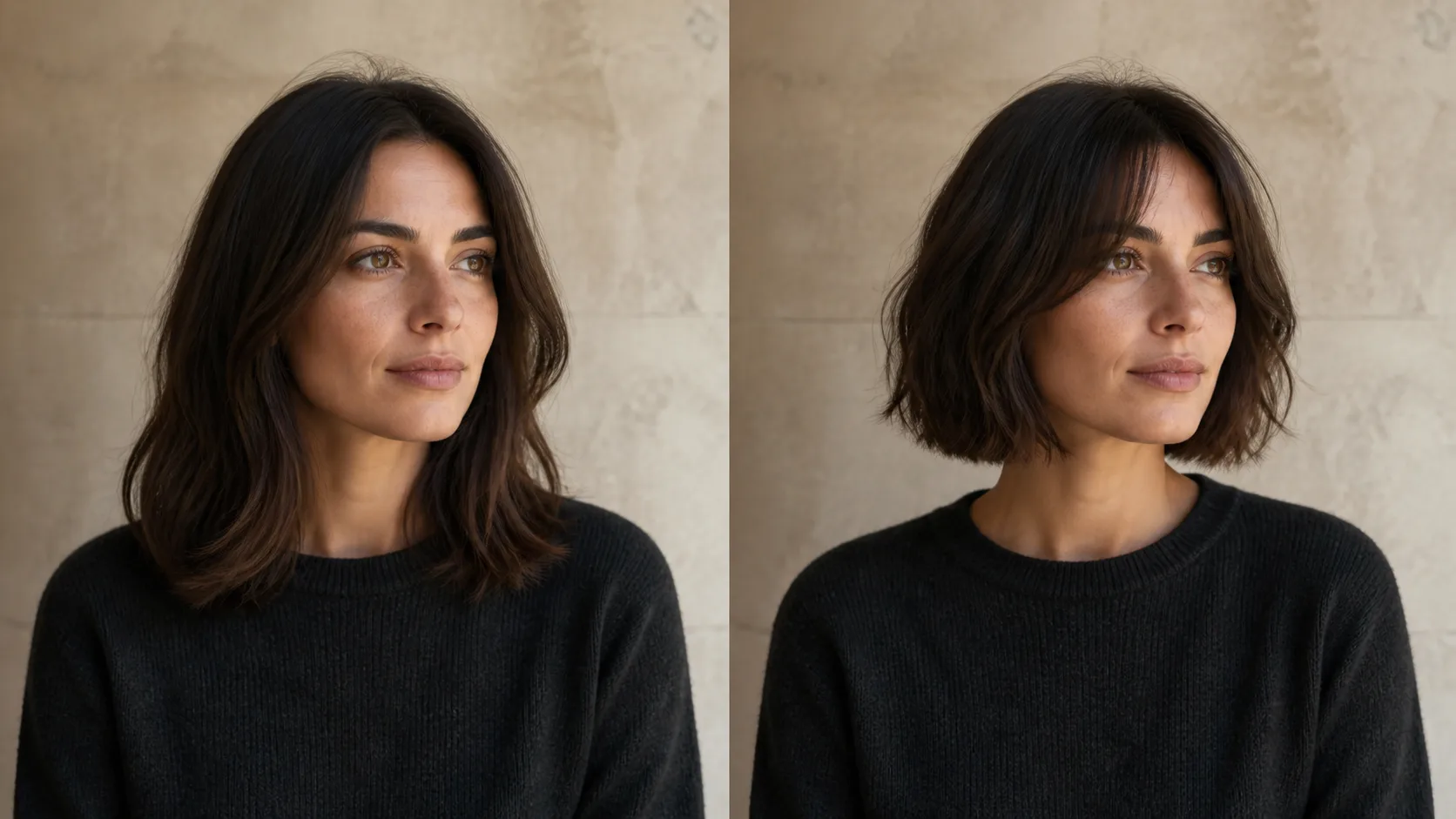
How to Preview a Haircut With AI Before You Commit
Learn how to preview a haircut with AI using better photos, precise prompts, reference images, and a realism check before visiting the salon.